Shutdown Hot Key
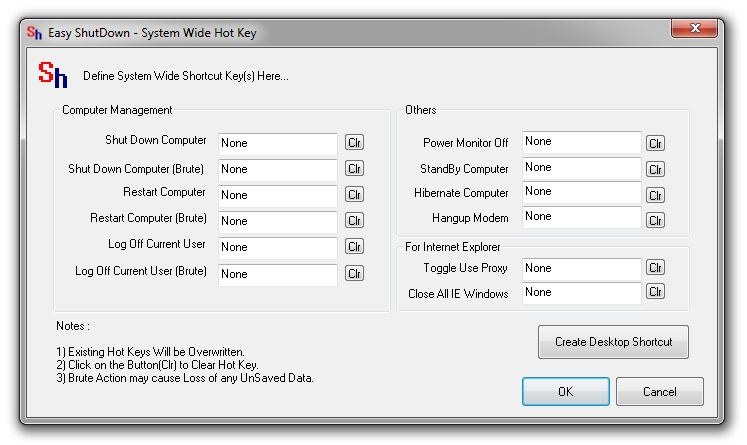
- Launch System Wide Hot Keys Dialog Box from the Easy Shutdown Windows Utility Menu by selecting File - > System Wide Hot Keys.
- Now Press the Desired Hot Key in the Edit Box next to label Shutdown Computer.
- Click on OK.
- That's it. The Shutdown Hot Key has been created. Now when you press the hot key, a confirmation diloag box will appear and after 15 seconds, shutdown computer will be initiated.
Hot Key to Restart Computer
- Launch System Wide Hot Keys Dialog Box from the Easy Shutdown Windows Utility Menu by selecting File - > System Wide Hot Keys.
- Now Press the Desired Hot Key in the Edit Box next to label Restart Computer.
- Click on OK.
- That's it. The Hot Key to Restart Computer has been created. Now when you press the hot key, a confirmation diloag box will appear and after 15 seconds, restart computer will be initiated.
Hot Key to Send Computer in Hibernation
- Launch System Wide Hot Keys Dialog Box from the Easy Shutdown Windows Utility Menu by selecting File - > System Wide Hot Keys.
- Now Press the Desired Hot Key in the Edit Box next to label Hibernate Computer.
- Click on OK.
- That's it. The Hot Key to send computer into hibernation has been created. Now when you press the hot key, a confirmation diloag box will appear and after 15 seconds, computer will be sent into hibernation (if supported).
Easy Shutdown Home